
MERN Stack 2025: The Ultimate Guide (With Code Samples)
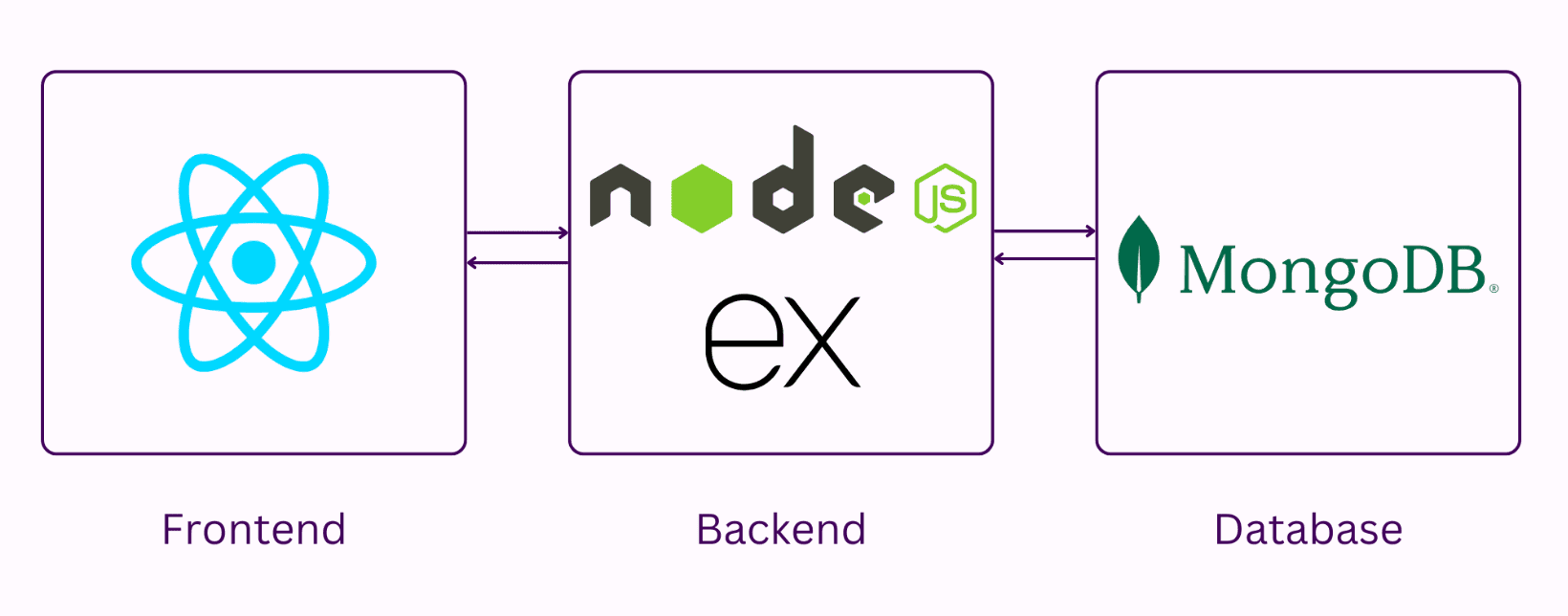
A complete, modern, and developer-friendly guide to the MERN Stack in 2025, covering architecture, best practices, updated workflows, and real code examples for building scalable full-stack applications.
The MERN Stack continues to dominate the full-stack development world in 2025. With JavaScript powering every layer, improved tooling, and the explosion of TypeScript adoption, MERN remains one of the most practical ecosystems for building real, production-ready applications.
Whether you’re a beginner stepping into full-stack development or a seasoned engineer refining your workflow, this guide gives you a complete modern overview—architecture, best practices, folder structures, and real code samples updated for 2025.
What Is the MERN Stack (2025 Edition)?
The MERN stack is a JavaScript/TypeScript-based ecosystem consisting of:
- MongoDB – NoSQL database for flexible and scalable data models
- Express.js – Lightweight backend framework for building APIs
- React.js – Component-based UI library for rich frontend experiences
- Node.js – JavaScript runtime powering the backend
What has changed in 2025?
- TypeScript is now the default, not optional.
- Modern React uses Server Components, Suspense, and Signals.
- Express apps follow modular + service-based architecture.
- MongoDB Atlas tooling makes database workflows smoother than ever.
Project Structure (2025 Best Practice)
Here’s a recommended structure for scalable MERN projects:
/server
  /src
    /config
    /controllers
    /services
    /routes
    /models
    /middlewares
    /utils
    /types
    server.ts

/client
  /src
    /components
    /hooks
    /lib
    /pages
    /context
    /services
    main.tsx
This keeps your code clean, maintainable, and production-ready.
Setting Up the Backend (Express + TypeScript)
Install Dependencies
npm install express cors mongoose dotenv jsonwebtoken bcrypt
npm install -D typescript ts-node-dev @types/express @types/node @types/cors
Basic Express Server (server.ts)
import express from "express";
import cors from "cors";
import dotenv from "dotenv";

dotenv.config();
const app = express();

app.use(cors());
app.use(express.json());

app.get("/", (_, res) => {
  res.json({ message: "MERN Stack 2025 API running!" });
});

app.listen(process.env.PORT || 5000, () => {
  console.log("Server running...");
});
Connecting to MongoDB (Mongoose 2025)

import mongoose from "mongoose";

export const connectDB = async () => {
  try {
    await mongoose.connect(process.env.MONGO_URI!);
    console.log("MongoDB Connected");
  } catch (err) {
    console.error(err);
    process.exit(1);
  }
};
Call connectDB() in your server entry file.
A Real Model Example (User Schema)
import { Schema, model } from "mongoose";

const userSchema = new Schema(
  {
    email: { type: String, required: true, unique: true },
    password: { type: String, required: true },
  },
  { timestamps: true }
);

export default model("User", userSchema);
Controller + Route Example
User Controller
import User from "../models/User";
import bcrypt from "bcrypt";

export const registerUser = async (req, res) => {
  try {
    const { email, password } = req.body;

    const hash = await bcrypt.hash(password, 10);
    const user = await User.create({ email, password: hash });

    res.json({ success: true, user });
  } catch (error) {
    res.status(400).json({ error: "Registration failed" });
  }
};
User Route
import { Router } from "express";
import { registerUser } from "../controllers/user.controller";

const router = Router();
router.post("/register", registerUser);

export default router;
Setting Up the Frontend (React 18+ in 2025)
Initialize:
npm create vite@latest client --template react-ts
Modern React Folder Structure
src/
  components/
  hooks/
  pages/
  context/
  services/
  styles/
  main.tsx
Making API Calls in React (2025 Pattern)
Create a services/api.ts file:
const API = import.meta.env.VITE_API_URL;

export const registerUser = async (data: any) => {
  const res = await fetch(`${API}/auth/register`, {
    method: "POST",
    headers: { "Content-Type": "application/json" },
    body: JSON.stringify(data),
  });

  return res.json();
};
React Component Example
import { useState } from "react";
import { registerUser } from "../services/api";

export default function Register() {
  const [form, setForm] = useState({ email: "", password: "" });

  const handleSubmit = async (e) => {
    e.preventDefault();
    const res = await registerUser(form);
    console.log(res);
  };

  return (
    <form onSubmit={handleSubmit}>
      <input
        type="email"
        placeholder="Email"
        onChange={(e) => setForm({ ...form, email: e.target.value })}
      />
      <input
        type="password"
        placeholder="Password"
        onChange={(e) => setForm({ ...form, password: e.target.value })}
      />
      <button>Register</button>
    </form>
  );
}
Advanced Topics for 2025 MERN Developers
🔒 Authentication Best Practices
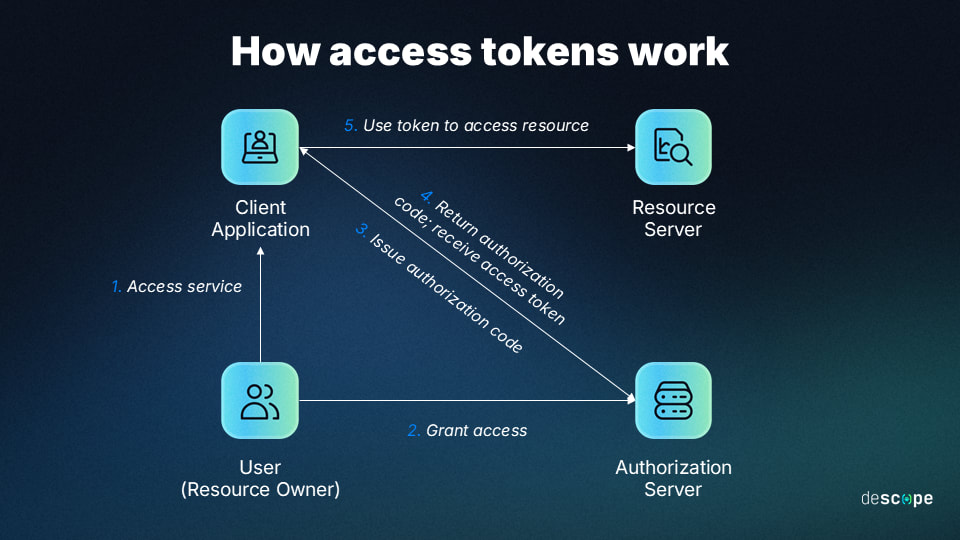
- Use JWT Access + Refresh tokens
- Hash passwords with bcrypt
- Implement rate limiting & input validation
- Add email verification & password resets
⚡ Performance Optimizations
- Use indexes in MongoDB
- Cache heavy queries with Redis or in-memory caches
- Implement lazy loading in React
- Use React Suspense for async components
🧱 Architecture Patterns
- Controller-Service-Repository pattern
- Interface-driven TypeScript
- Modular route splitting
- Environment-based configs
Deployment in 2025
Backend
- Render
- Railway
- AWS Lambda (Express wrapped in serverless)
Frontend

- Vercel
- Netlify
- Cloudflare Pages
Database
- MongoDB Atlas
All integrate smoothly with CI/CD pipelines.
Final Thoughts: Why MERN Still Matters in 2025
The MERN stack remains unstoppable because:
- It’s fast to build with
- Uses a single language
- Has massive community support
- Easily scales with microservices
- Works beautifully with TypeScript
Most importantly—it lets developers ship full products quickly, which matters more than ever in 2025.